
 Dhruv Patel
 Contents
There’s no shortage of AI sales tools in 2026.
The problem is that most of them automate the wrong things; they speed up sending, but don’t help you send smarter.
More emails go out, but reply rates stay flat, and follow-ups still fall through the cracks.
I tested 11 tools that take a different approach.
These focus on the parts of sales that actually move revenue, like:
- Finding the right people,
- Writing messages that get responses,
- And knowing exactly who to follow up with next.
Check them out, and you’ll likely find the one that fits your sales process best. the one that fits your sales process best.
AI Sales Tools – TOC
TL;DR: Best AI Sales Tools at a Glance
If you’re short on time, here’s a quick snapshot of every tool on this list, what it does best, what it costs, and who it’s built for.
| Tool | Best For | Starting Price | G2 Rating |
|---|---|---|---|
| Saleshandy | Cold email outreach + lead generation | $25/month | 4.6/5 |
| Apollo.io | Prospect list building + enrichment | $49/user/month | 4.7/5 |
| Salesforce Einstein | Enterprise CRM with AI | $50/user/month | 4.5/5 |
| Gong.io | Sales call analysis + coaching | Custom pricing | 4.7/5 |
| Fireflies.ai | Meeting transcription + notes | $10/user/month | 4.8/5 |
| Gamma.app | AI-powered sales presentations | Free / $10/month | 4.7/5 |
| Lavender | Sales email coaching + scoring | $29/month | 4.9/5 |
| Salesloft | Sales engagement workflows | Custom pricing | 4.5/5 |
| HeyGen | AI video for outreach | $24/month | 4.7/5 |
| Agent Frank | AI SDR automation | $499/month | 4.0/5 |
| Clari | Revenue forecasting + pipeline | Custom pricing | 4.5/5 |
The 11 Best AI Sales Tools for Every Part of the Sales Process
If you want a quick look at AI sales tools, here is the list.
- Saleshandy (AI-powered Tool)
- Apollo.io
- Salesforce Einstein
- Gong.io
- Fireflies.ai
- Gamma.app
- Lavender
- Salesloft
- HeyGen
- Agent Frank
- Clari
1. Saleshandy
- G2 Rating: 4.6/5 (700+ reviews)
- Capterra Rating: 4.5/5 (120+ reviews)
Best For: Cold email campaigns and automated outreach
If you need one tool that handles prospecting, cold email outreach, and prospect management without stitching together three different platforms,
Saleshandy covers that entire workflow.
I’ve been testing it across lead generation, AI-powered sequencing, deliverability management, and now their recently launched outbound CRM.
What makes it stand out is how AI and automation work together. It not only makes your outreach faster but also keeps it safer and more effective.
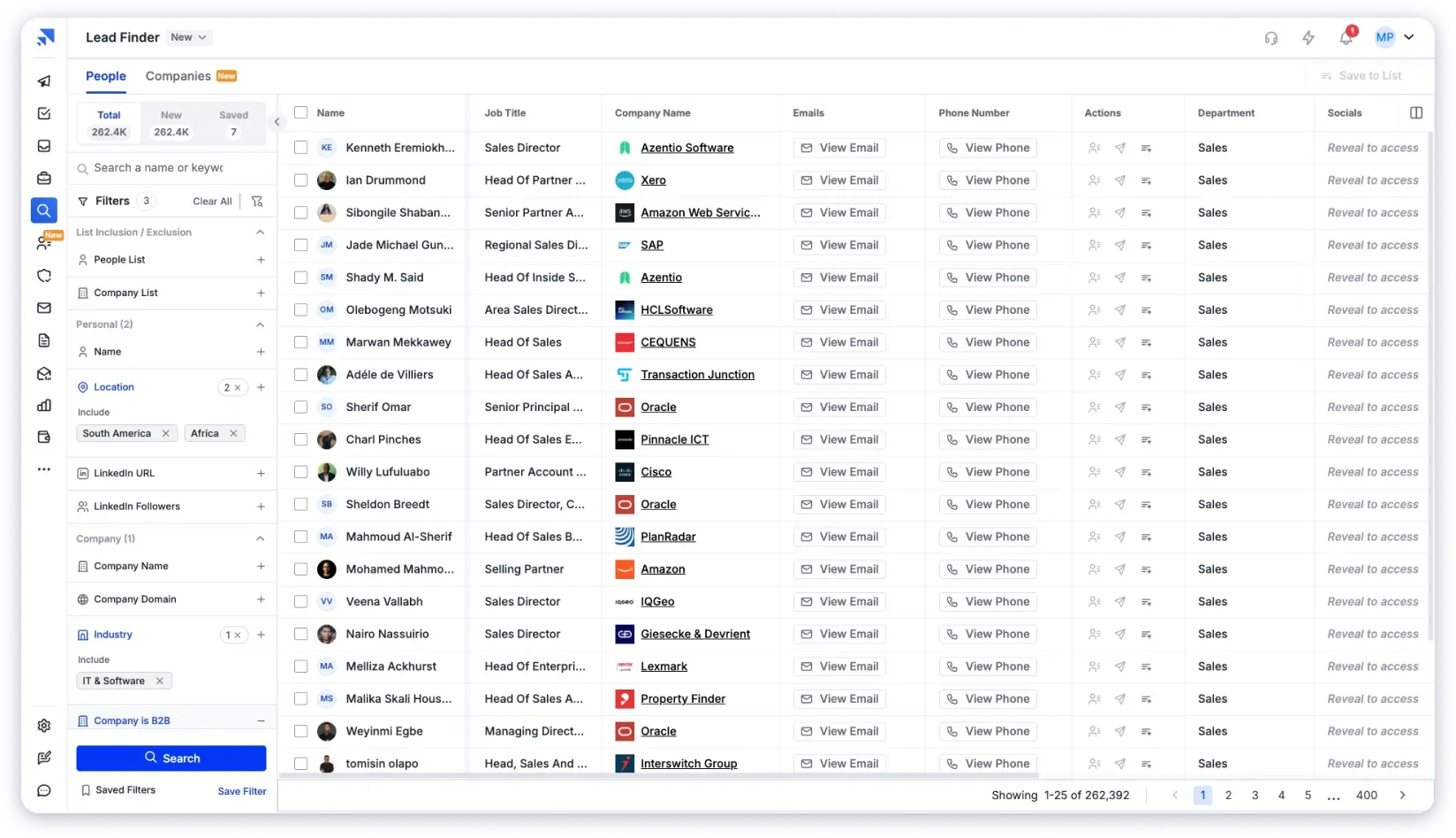
What stood out is that the AI features aren’t just surface-level prospect enrichment; for example, actually research each contact using LLMs and web data before you write a single email.
The platform also doesn’t charge per email account, which makes a big difference when you’re scaling outreach across multiple inboxes.
AI Features You Will Love
- AI-Powered Lead Search to find the right prospects faster
- AI-Driven Personalization for crafting better email sequences
- A Complete Deliverability Suite to reduce email bounces and protect the sender’s reputation
- AI Prospect Enrichment uses AI models and pulls context signals like job changes, company updates, and industry shifts to generate personalized opening lines and icebreakers you can plug directly into your cold emails.
Unlike many tools that either provide data or handle outreach, Saleshandy does both.
Its AI features save time, improve personalization, and help your emails reach the inbox.
The database is large and regularly updated, so you always have fresh prospects to work with.
Key AI Features:
- Lead Finder – Access a database of 800M+ verified B2B contacts and 60M+ company profiles to find accurate decision-makers.
- AI Sequence Co-Pilot – Generate your complete email sequence with this AI feature, and save time on manual writing.
- Saleshandy CRM – A built-in outbound CRM with Kanban pipeline, prospect activity timelines, custom stages, 1:1 emails, tasks, and notes so you can manage reply conversations without switching to another tool.
- AI Prospect Enrichment – Enrich prospects using AI models to generate hyper-personalized icebreakers and opening lines at scale, going beyond basic merge tags.
- Bounce Detector – Identifies invalid or risky emails before sending, protecting the sender’s reputation.
- Email Variants – Multiple subject lines and message versions can be created to test and improve the reply rates.
- Trigger-Based Sequences – Adjusts outreach based on prospect actions like opens, clicks, or replies.
- Inbox Radar – Tests campaigns against spam filters before sending and suggests improvements.
Pros and Cons of Saleshandy
Pros
- Connect unlimited email accounts at no extra cost.
- Full AI workflow from prospecting to CRM, no need for separate tools for finding leads, sending emails, and managing replies
- AI Prospect Enrichment generates personalized openers using real-time context, not just merge tags
- Built-in deliverability suite (warm-up, bounce detection, inbox placement testing) keeps emails out of spam
- The outbound CRM lets you track prospect conversations in a visual pipeline without leaving the platform
Cons
- The free trial is limited to 7 days.
Pricing:
- Outreach Starter: $25/month
- Outreach Pro: $69/month
- Outreach Scale: $139/month
- Outreach Scale Plus100k: $209/month
Free trial available for 7 days.
To know more, check out detailed pricing here.
2. Apollo.io
- G2 Rating: 4.7/5 (9000+ reviews)
- Capterra Rating: 4.5/5 (350+ reviews)
Best For: Building targeted prospect lists with AI assistance
Apollo gives you access to over 210 million contacts and uses AI to help you find the right prospects faster.
The platform has an AI that analyzes your existing customers to identify similar types of prospects for you.

Based on the conversion, it scores leads and helps you prioritize your outreach efforts.
With Apollo AI, you can know the right people to talk to. You can even take help from AI to write personalized messages and put your outreach campaigns on autopilot.
Key AI Features:
- AI Lead Scoring – Apollo gives a score to each prospect on the basis of their activity and engagement.
- Intent Data – Get the important insights into company behavior, such as hiring or search activity.
- AI Filters – Apollo’s filters use AI signals to narrow down lists, making prospecting faster and more precise.
- Outbound Copilot – It takes over repetitive tasks by building prospect lists and running outreach campaigns across email, phone, and LinkedIn.
- Lead Finder – Searches Apollo’s 210 million contacts and 35 million companies, and gets you a clean list of verified prospects in seconds.
Pros and Cons of Apollo
Pros
- It offers a good database of US and European companies
- Streamlined outreach workflow
- Free plan with clear pricing
- It offers a simple and user-friendly interface
- AI-powered email personalization
Cons
- Limited free plan
- Data overload can be overwhelming for users
- Some data may be inaccurate
Pricing:
- Basic: $49/user/month (Billed annually)
- Professional: $79/user/month (Billed annually)
- Organization: $119/user/month (Billed annually)
A free plan is also available.
3. Salesforce Einstein
- G2 Rating: 4.5/5 (3,284)
- Capterra Rating: 4.0/5 (3 reviews)
Best For: Enterprise CRM with built-in AI capabilities
Salesforce Einstein is an AI tool built into the Salesforce CRM to help sales teams get work done. It shows which leads are likely to convert and which deals need attention.
It automates routine CRM tasks like logging activities, following up with prospects, and managing your pipeline. This saves time and reduces manual work for your team.

Einstein learns from your sales patterns and gives insights you won’t get from basic reports. The more you use it, the better it guides your actions.
It also suggests which leads to contact and which deals need work. This makes outreach faster and helps your team handle more tasks.
Unlike separate tools, Einstein works inside Salesforce CRM. It combines AI insights with your existing data, so everything your team needs is in one place.
Key AI Features:
- Conversation Insights – It can identify important mentions, trends, and actionable items in sales calls.
- Einstein Lead Scoring –Analyzes historical data, identifies key lead traits, and scores leads based on past successful conversions.
- Einstein Forecasting – You can get the insights on wins, pulled-in opportunities, and key factors based on best-case and committed opportunities to predict sales outcomes with accuracy.
- Activity Capture – Logs emails, calendar events, and calls automatically, removing the need for manual CRM updates.
- Automated Data Entry – It updates the CRM records with information from emails, calls, and meetings.
Pros and Cons of Salesforce Einstein
Pros
- Simple and easy to use for the team
- It works well with the Salesforce ecosystem
- The platform can be customized to fit business needs
Cons
- Accuracy depends on data quality.
- Limited customization for complex needs.
Pricing
- Einstein Conversation Insights: $50USD/user/month
- Einstein Conversation Insights and Sales Engagement: $50USD/user/month
- Einstein Conversation Insights and Enablement: $100USD/user/month
4. Gong.io
- G2 Rating: 4.7/5 (6,000+ reviews)
- Capterra Rating: 4.8/5 (500+ reviews)
Best For: Analyzing sales conversations and deal coaching
Gong is an AI-powered platform that listens to your sales calls and captures every detail. It creates accurate transcripts and shows what works and what doesn’t.
It helps sales teams understand customer conversations and improve results. Gong studies top sellers, notices patterns in their questions, and shows other reps how to do the same.
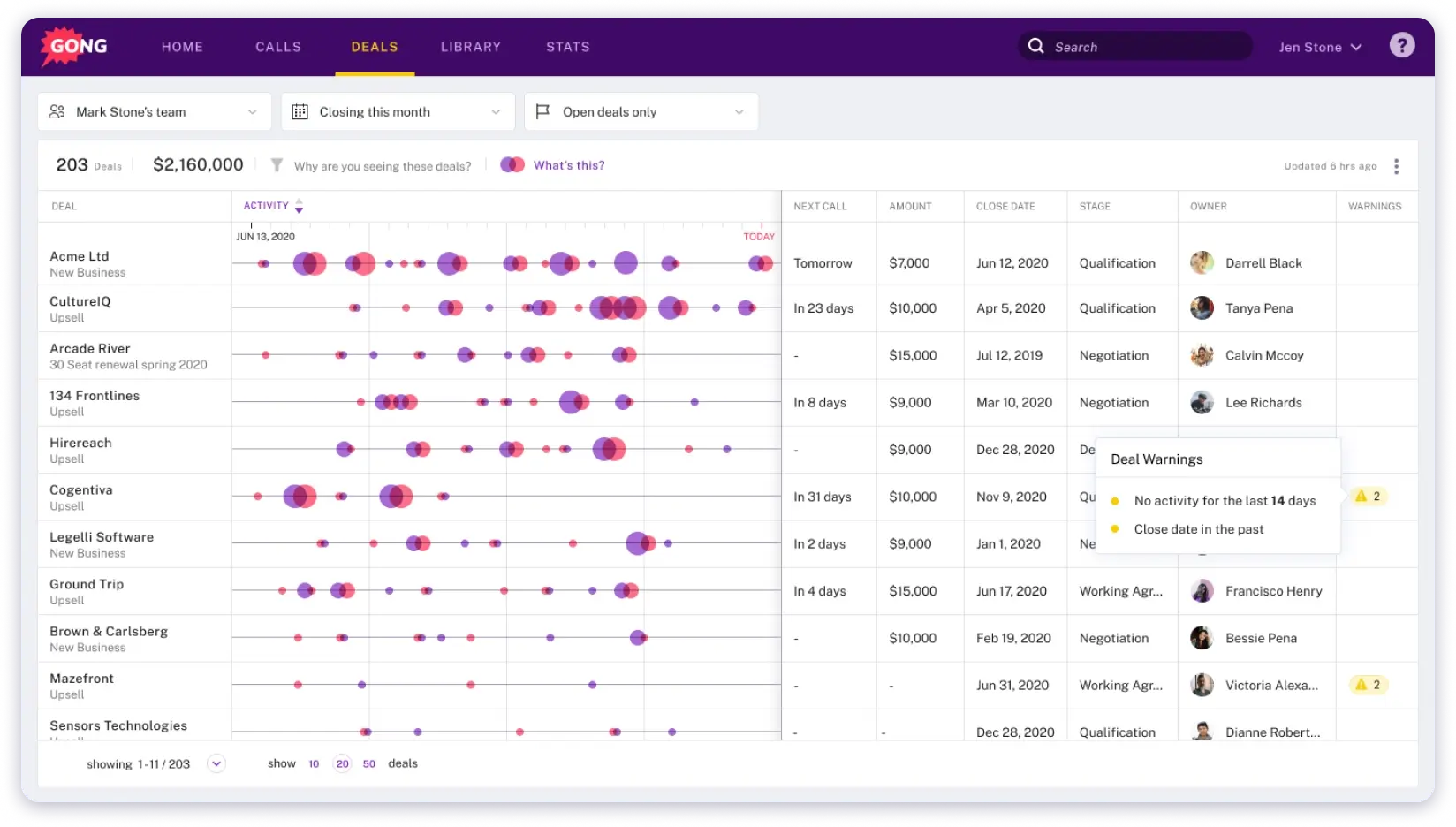
The platform tracks deals and interactions, pointing out which calls are most likely to close. This helps your team spend time on conversations that matter most.
Think of Gong as a sales assistant that never gets tired.
It gives insights, suggestions, and feedback to help your team handle calls better and close more deals.
Key AI Features:
- Conversation Intelligence – Records each call and meeting, then sifts through the words to spot trends, objections, and fresh chances.
- Forecasting – AI studies the pipeline and gives an unbiased view of where the numbers will land.
- Deal & Pipeline Analytics – Tracks deal movement in real time and raises a flag before revenue starts to slip.
- Revenue AI Agents – Handles follow-ups and pipeline updates quietly in the background, so reps can stay in the conversation.
- AI Coaching Insights – Compares a rep’s calls to top performers and points out clear, practical ways to improve.
Pros and Cons of Gong.io
Pros
- AI analyzes customer conversations to provide actionable insights
- Superior Call Recording & Management
- Praised for being easy to use and integrating well with existing communication tools and CRMs
- Deep Analytics & Forecasting
- Recorded calls, helping teams learn from each other, and onboarding new hires
Cons
- Some functionality issues
- Pricing not mentioned
Pricing
- Pricing not available
5. Fireflies.ai
G2 Rating: 4.8/5 (700+ reviews)
Capterra Rating: 4.3/5 (12 reviews)
Best For: Automated meeting transcription and analysis
With Fireflies.ai, you don’t have to take notes during your calls.
The AI joins your meetings, records everything, and creates searchable transcripts with action items.
It helps sales teams capture every detail from customer calls without distractions.
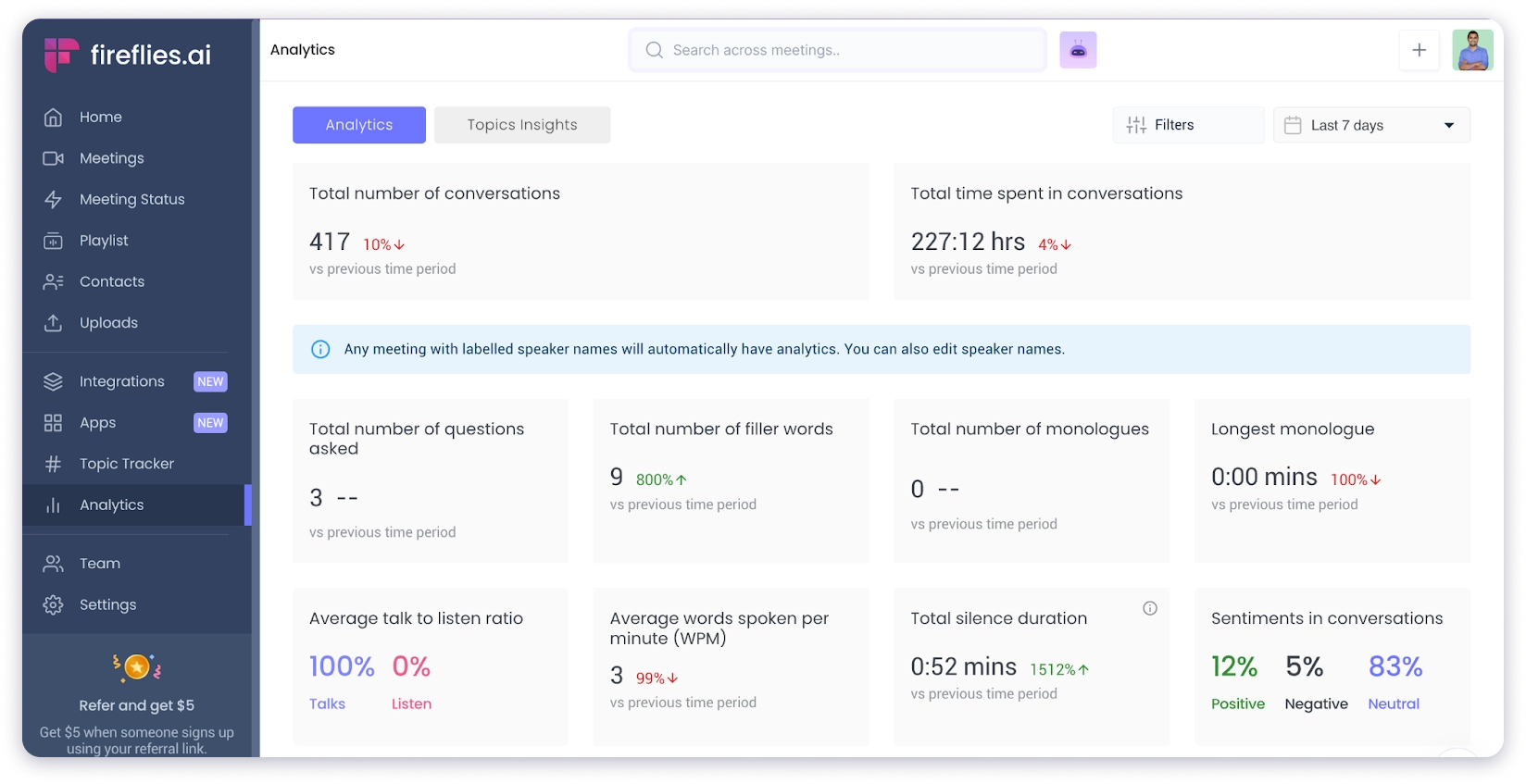
The AI identifies key points like pricing discussions, next steps, and objections. You can review only the important parts without listening to the entire recording.
Fireflies stands out with its “Ask Fred” feature. Powered by GPT, it lets you get answers to any question related to a specific meeting.
The tool also integrates directly with CRMs like Salesforce and HubSpot, automatically logging call notes and action items into your pipeline.
Key AI Features:
- AI Call Recording & Transcription – The system records each call, transcribes it, and produces a short recap.
- Smart Note-Taking – All the important notes are taken by the tool, so you don’t have to write them down manually.
- Conversation Analysis – The tool listens back and spots patterns you might miss.
- Sales Coaching Tools – Clear metrics, tips, and scores lead to improvement and boost the outreach.
- Next-Best Action – Clear nudges show reps the smartest move to make right now.
Pros and Cons of Fireflies.ai
Pros
- It saves time by transcribing
- Generates searchable meeting summaries with key info, quotes, and decisions
- Can review meeting highlights, action items, and decisions in a centralized platform
Cons
- Limited advanced features
- Pricing stays hidden until you sign in
Pricing
- Free: $0 (800 minutes storage, basic features)
- Pro: $10/user/month (billed annually)
- Business: $19/user/month (billed annually)
- Enterprise: $39/user/month.
Note: AI credits are limited on all plans. Heavy users may need add-on credit packs.
6. Gamma.app
Best For: Creating professional presentations faster
Gamma.app isn’t a traditional sales tool in the way others on this list are.
But if your sales process involves creating pitch decks, one-pagers, or proposal slides, it’s surprisingly relevant.
Gamma.app turns simple text prompts into full presentations in minutes. You don’t need design skills or spend hours formatting slides.
The AI creates slides automatically, selects images, sets colors, and applies fonts. All you need is a short prompt.
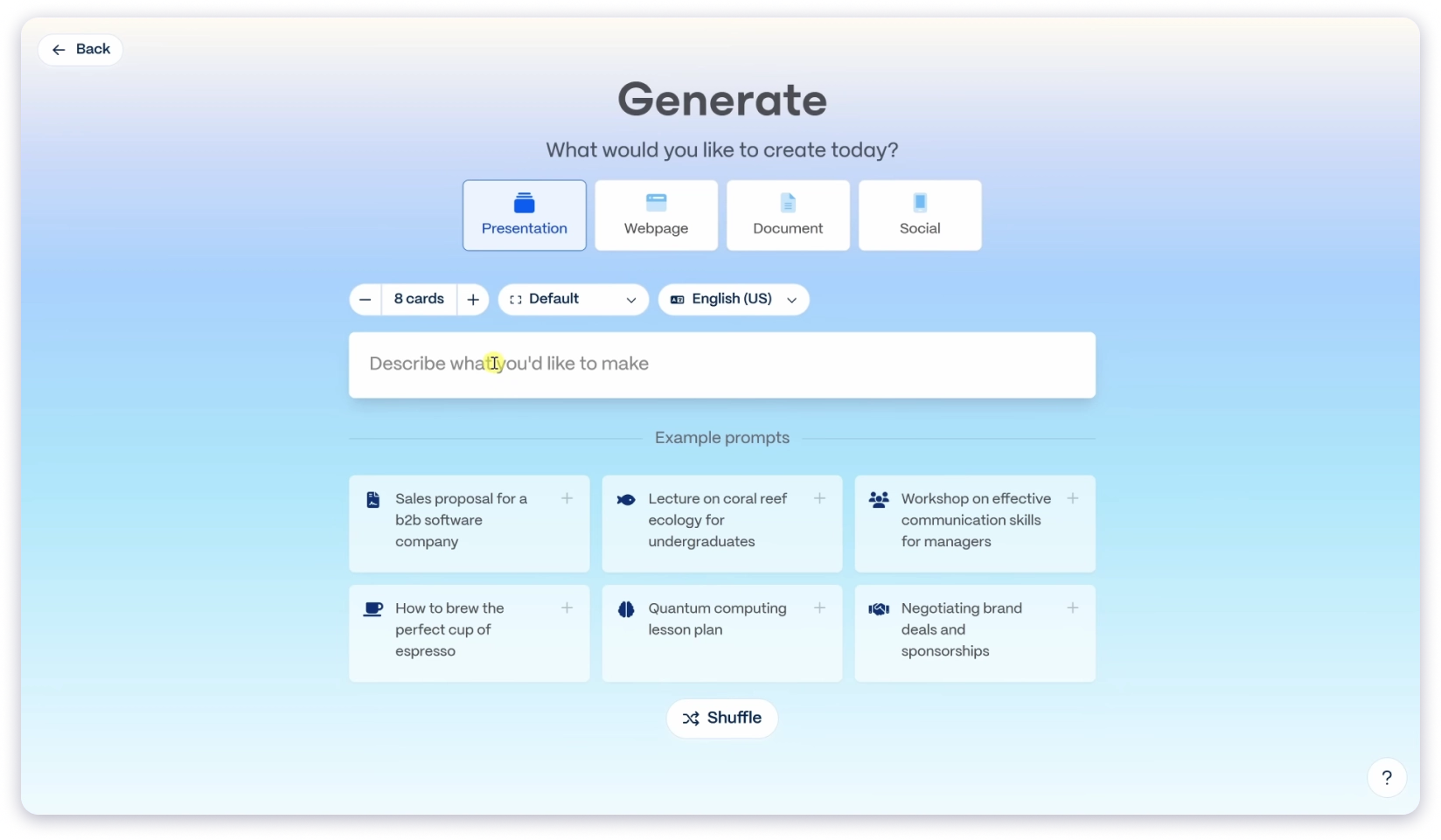
Editing is simple. Once your deck is ready, you can export it to PowerPoint, PDF, or share it as a link.
Raw ideas become polished presentations quickly, letting you focus on the story instead of the slides.
How to Use Gamma.app
Step 1 » Write a short prompt with your key ideas
Step 2 » Let Gamma.ai generate the full presentation automatically
Step 3 » Review the slides and make quick edits if needed
Step 4 » Export the deck to PowerPoint, PDF, or shareable link
Gamma.app makes creating presentations fast and easy, so you can spend more time on your ideas and less on slides.
Key AI Features:
- Instant Deck Generator – When you drop in a prompt or outline, you get a full slide deck in seconds.
- Smart Layouts & Themes – AI applies clean layouts and 100+ themes (or your own brand) so every slide matches.
- Image Maker Inside – The tool can generate fresh images or rework existing ones without leaving the editor.
- Multi-Format Export – Let you share the file as a link or save to PPT, PDF, PNG, Google Slides, or even a website.
- Engagement Tracking – After you send a deck, Gamma tells you who opened it and where they spent time.
Pros and Cons of Gamma
Pros
- 100-plus themes with easy brand import
- Opens & scroll-time analytics after you share
- Live co-editing for teammates
- Exports to PPT, PDF, Google Slides, link, or instant website
Cons
- No reviews available
- Output can feel generic
Pricing
- Plus: ₹400/seat/month
- Pro: ₹950/seat/month
- Ultra: ₹7833.25/seat/month
Free plan available for simple projects and getting to know Gamma.
7. Lavender
- G2 Rating: 4.8/5 (62 reviews)
- Capterra Rating: No reviews
Best For: Writing effective sales emails with AI coaching
Lavender is an AI email assistant built to help sales reps write emails that get replies. It scores each email in real time and suggests improvements in tone, clarity, and structure.
This helps reps send messages that connect with prospects and generate more responses.
If a line is weak, Lavender points it out and suggests a cleaner version. Sometimes it’s just a single word change.
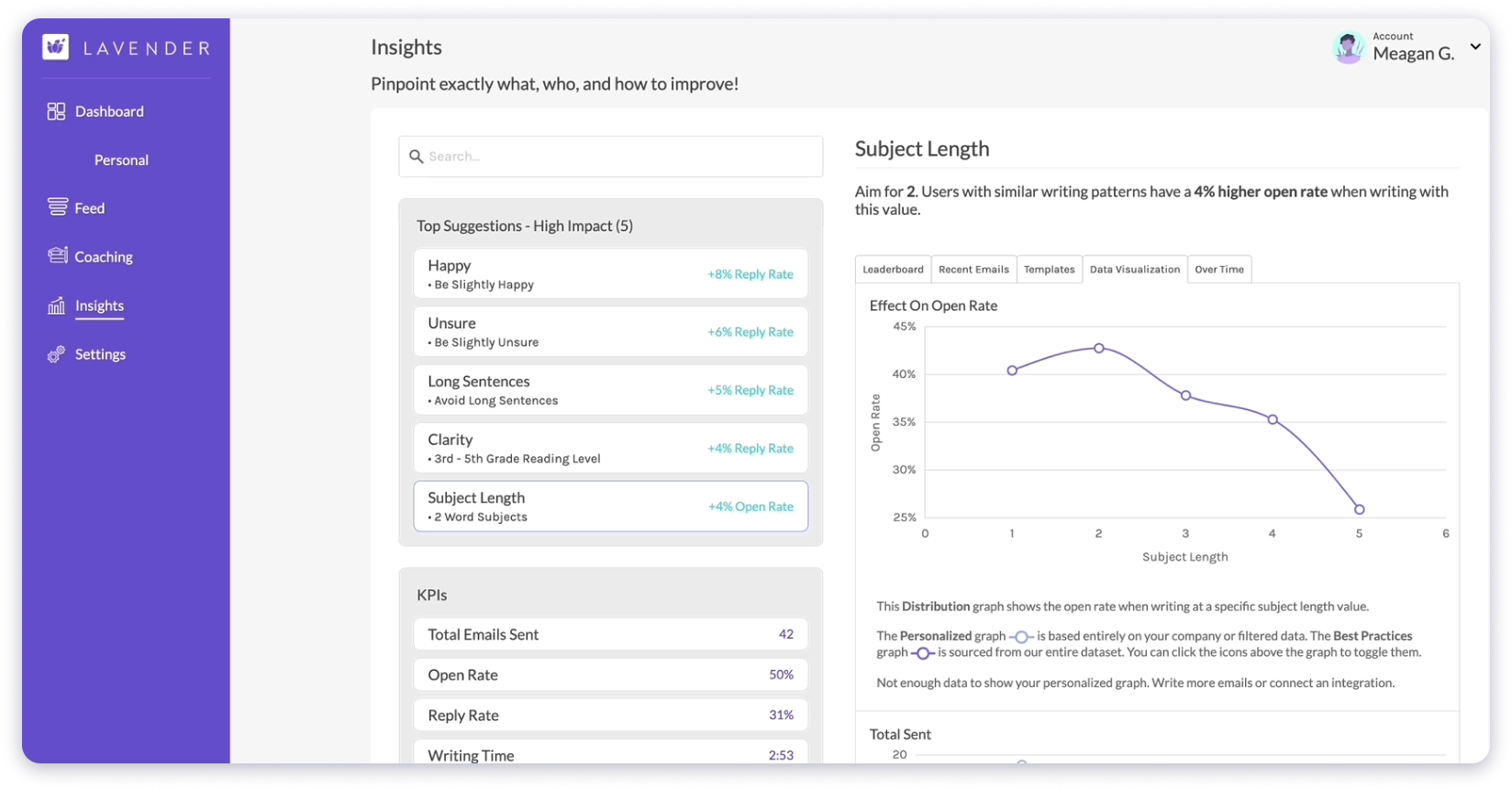
Other times, it rewrites the whole sentence. A score shows if your email is ready or needs more work.
When you open a lead, key facts appear: job title, recent posts, and city.
Lavender shows how to use these details in your opener, making each email feel personal, not canned.
In short, Lavender does one thing well: it helps you send sales emails that people actually answer.
Key AI Features:
- Campaign Generation – Tell your goal, and the tool builds an entire outreach sequence in seconds.
- Content Library – All approved sales materials remain in one place, which is easy to grab when needed.
- Bulk Personalization – It’s AI reshapes each message for every prospect, even on long lists.
- Personalization Helper – You can drop in a few details, and the note reads like it was hand-written.
- Email Analytics – Opens, clicks, and replies are tracked so you know what works.
Pros and Cons of Lavender
Pros
- Shows a score for each email and simple tips to fix it
- It pulls fresh facts about every prospect, so personalizing is quick
- Works inside Gmail, Outlook, HubSpot, and more tools
- The tool is free to install, so you can try before you buy
Cons
- Built only for email outreach
- Cepterra reviews are not available
Pricing
- Free: 5 emails/month (basic trial)
- Starter: $27/month
- Individual Pro: $45/month
- Teams: $89/seat/month
8. Salesloft
- G2 Rating: 4.5/5 (5000+ reviews)
- Capterra Rating: 4.3/5 (200+ reviews)
Best For: Automating multi-touch sales sequences
Salesloft helps sales teams handle prospecting, outreach, follow-up, and closing deals.
Conductor, the built-in AI, reviews past buyer behavior. It shows the best time and channel to reach out, suggests talking points or email lines, and ranks prospects so top leads come first.
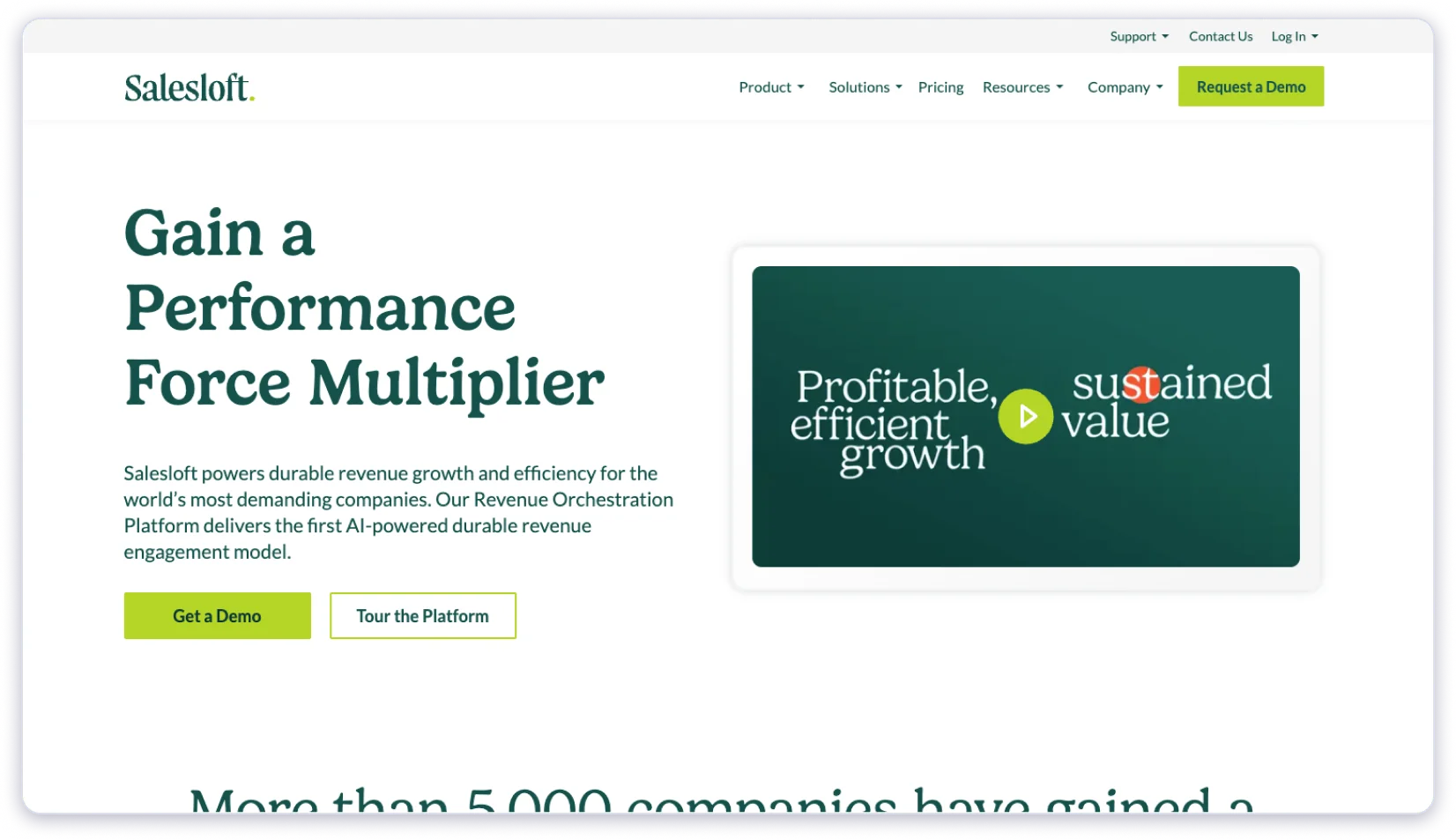
Routine tasks are automated, while real conversations stay in the rep’s hands. Reps stay focused, managers get insights, and leaders see a clear pipeline.
In short, Salesloft combines AI guidance with real sales actions, making outreach faster and easier.
How to Use Salesloft
Step 1 » Add your leads and let Conductor analyze them
Step 2 » Check AI suggestions for timing, messaging, and ranking
Step 3 » Reach out using recommended talking points or emails
Step 4 » Track responses and update the pipeline automatically
Key AI Features:
- Cadence Automation – The multi-channel workflows run themselves. Sends emails, calls, and social messages on a set schedule.
- AI Emails and Calls – It adjusts each message or call based on the prospect’s activity.
- Conversation Intelligence – The calls get recorded, turned into text, and top moments surface for coaching.
- Deal Health Scoring – Monitors the engagement, and it shows which deals are at risk and which are on track.
- Smart Forecasting – Uses past results and current data to predict upcoming sales.
Pros and Cons of Salesloft
Pros
- Provides advanced automation for follow-ups
- You can get detailed analytics for tracking sales performance
- Easy to integrate with CRM platforms like Salesforce
Cons
- High pricing can be disappointing for smaller businesses
- Complex interface for new users
Pricing
- Get in touch with the team for pricing details.
9. HeyGen
- G2 Rating: 4.8/5 (1000+ reviews)
- Capterra Rating: 4.8/5 (300+ reviews)
Best For: Creating personalized video content at scale
Don’t get worked up about the video quality of your products or content anymore. HeyGen is here to solve your issues.
Heygen is an AI-powered video creation platform built for sales teams who want to stand out.

It lets users create high-quality videos in no time. Turn text scripts into videos with AI avatars, voice cloning, and customizable features.
Its customization options ensure messages look polished and on-brand, while analytics show which videos are driving engagement.
One more thing you can get: solutions for various needs like marketing, sales outreach, and internal training, providing a fast, scalable, and accessible alternative to traditional video production for businesses and creators.
Key AI Features:
- Text-To-Video Creator – Feed a script, choose an avatar, and HeyGen will turn that into a full HD or 4K video.
- Audio-To-Video Tool – Upload or record your voice and get a talking-avatar video in minutes.
- AI Video Avatars – Pick from 500+ stock characters or clone yourself from a single photo.
- Voice Cloning & 70+ Languages – You get the feature to match the tone, accent, and language for global audiences.
- Video Translation & Lip-Sync Dubbing – Re-voice videos for new markets while keeping lips in sync.
Pros and Cons of HeyGen
Pros
- Has a big avatar Library
- Offers custom cloning for the spokesperson
- The text-to-audio feature is also available
- Supports 70 + languages and automatic localization
- Free tier to test the platform before paying
Cons
- Paid plans start at $29 / month; higher tiers add up for bigger teams
- Longer videos quickly consume credits
- Creating a personal avatar requires a consent video, adding an extra step
Pricing
- Free: $0 (1 credit, limited features)
- Creator: $24/month (billed annually)
- Business: $108/month (billed annually)
- Enterprise: Custom pricing
10. Agent Frank
- G2 Rating: 4.6/5 (69 reviews)
- Capterra Rating: No reviews available
Best For: Autonomous sales development and outreach
Agent Frank is an AI SDR product by Salesforge.
It’s designed to automate the prospecting and outreach workflow end-to-end, finding leads, writing emails, and sending follow-ups without human input.
The best part about Agent Frank from Salesforge is that it works more like having a real sales rep on your team rather than acting as just a tool.
You can let it handle everything on its own or keep yourself in the loop with the co-pilot mode.
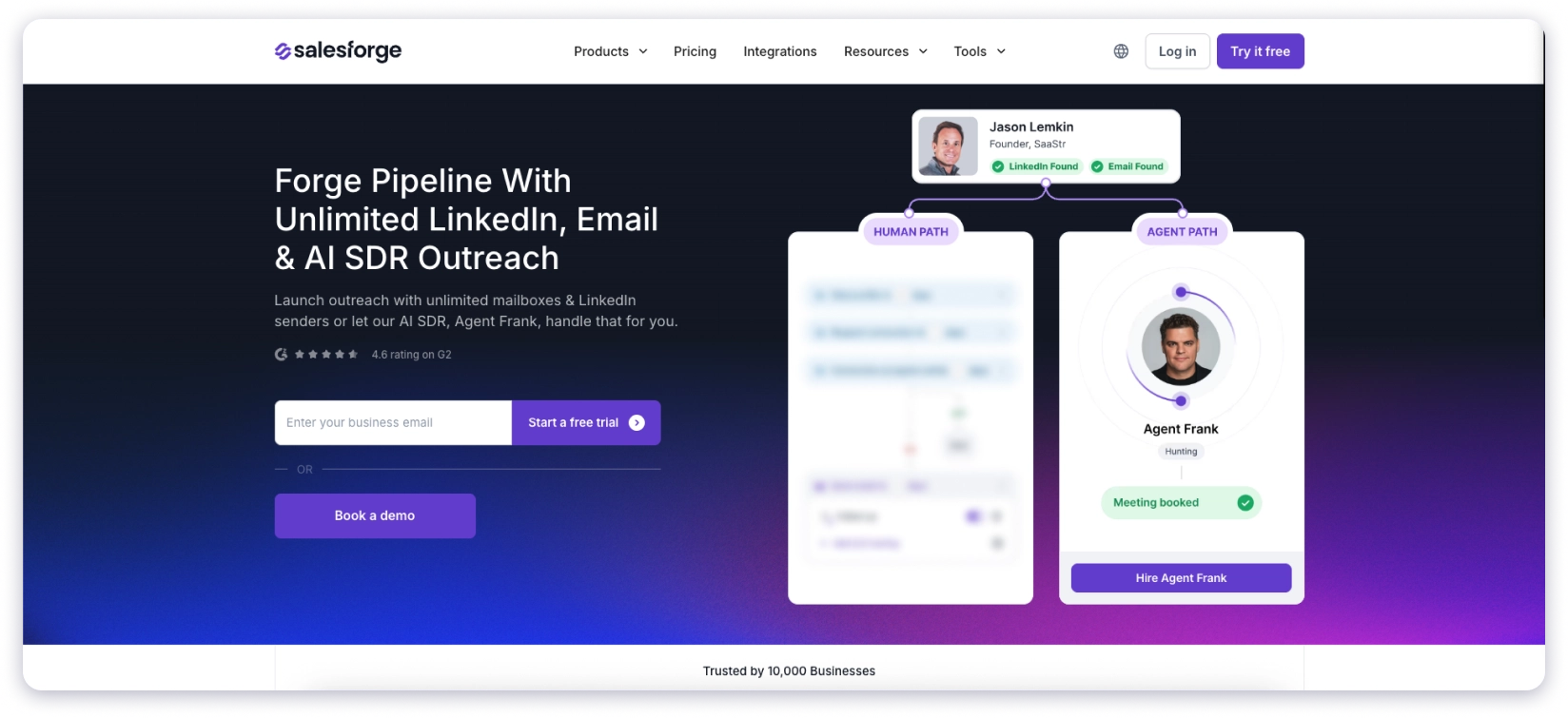
Agent Frank works great for sales teams, founders, and marketers who need to scale their outreach but don’t want to lose that personal touch or spend all day building prospect lists.
I really liked this tool after experiencing it myself because this AI SDR actually learns your product, and it adapts to how you want to sell it.
Key AI Features:
- Meeting Coordination: Syncs with your calendar, sends polite nudges, and doesn’t stop until the meeting is locked in.
- Two Operating Modes: Pick full autopilot and let Frank handle everything, or switch to co-pilot and approve each message before it goes out.
- Email Setup: Connect your own inbox—or Infraforge—in minutes, and the built-in warm-up keeps messages landing in the primary folder.
- Performance Learning: As each sequence runs, Frank tracks results and adjusts wording and timing to improve replies.
- Smart Lead Generation: Frank searches for new prospects, enriches their profiles, and filters them so they match the criteria you set.
Pros and Cons of Agent Frank
Pros
- Manages different stages like prospecting, follow ups or emailing
- Better at specific outreach
- It saves tons of time
- Can operate 24/7 to find and process new leads based on your criteria
Cons
- Learning the setup can take some time
- Works best when you have clear data about your ideal customers
Pricing
- $416/month (Billed annually)
11. Clari
- G2 Rating: 4.6/5 (5000+ reviews)
- Capterra Rating: No Review Available
Best For: Enterprise revenue intelligence and forecasting
Clari is my personal favorite because it gives full visibility into the sales pipeline. I can pull data from across my business and see exactly where things stand.
It captures sales activity automatically and turns it into forecasts, risk alerts, and actionable insights. This means I don’t have to guess and can rely on accurate, data-backed numbers.
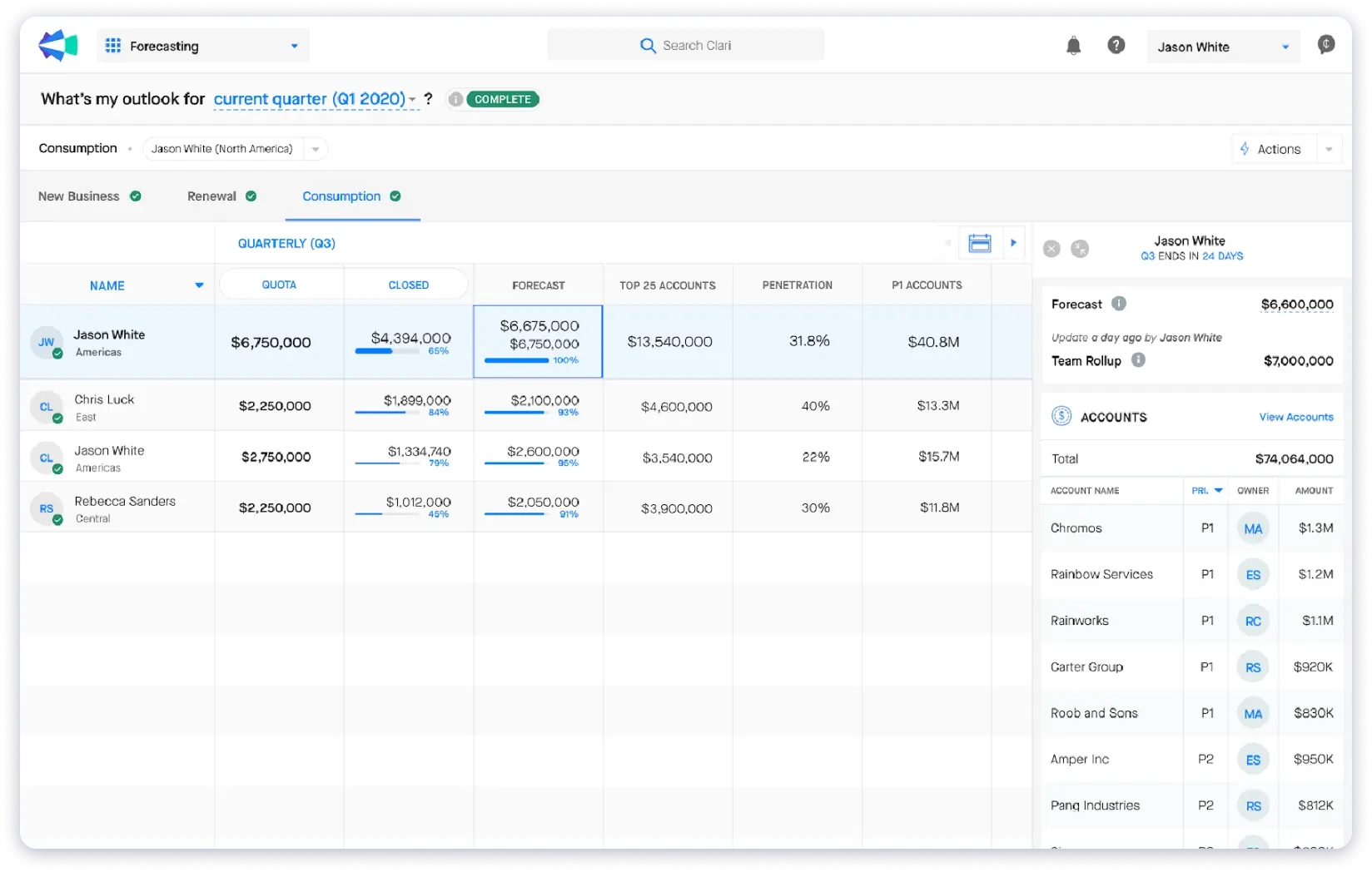
The feature I like most is forecasting. It gives reliable insights based on real business data, so I know which deals need attention and where to focus.
Clari works best for sales leaders, account executives, and revenue operations teams.
Clari collects data from everywhere automatically. It shows which deals might be at risk and gives insights I wouldn’t get from basic reporting. Using it makes planning and decision-making much easier.
Key AI Features:
- AI revenue forecasting – Looks at your sales data, then gives a clear, up-to-date number you can trust.
- Risk detection – Spots shaky deals early and raises a flag so you can step in.
- Team alignment – Sales, marketing, and RevOps all see the same data and stay on the same page.
- Pipeline inspection – Watches deal activity day by day and notes when momentum slows.
- Activity automation – Pulls emails and calendar events into the system, giving a full view of each deal’s health.
Pros and Cons of Clari
Pros
- It is very easy to use, and you can also get insights into the sales pipeline to know which kind of leads close more often
- Offers predicting revenue to find out what exactly I should know
- It saves your time by tracking and reporting everything automatically
Cons
- Pricing is a little higher for small businesses and solopreneurs
- The initial setup may take some time
Pricing
- Contact the team to get the quote
You can also explore AI SDR tools related to prospecting and outbound sales automation.
Building a Smarter Sales Process with AI
The tools on this list cover different parts of the sales process, and that’s intentional.
No single tool does everything well.
What I’d suggest is this: pick one or two tools based on where your team loses the most time or deals.
If cold outreach is your main channel, start with a platform that handles prospecting, sequencing, and follow-up management in one place. If your team is call-heavy, invest in conversation intelligence first.
The biggest mistake I see is buying five tools and using none of them properly.
Start focused, measure results, and expand from there.
Also Read: Best Sales Intelligence Tools
FAQs on AI Sales Tools
1. What are AI sales tools, and how do they help?
AI sales tools use artificial intelligence to automate parts of the sales process, from finding leads and writing emails to analyzing calls and forecasting revenue.
They reduce manual work and help sales teams focus on conversations that are most likely to convert.
2. Which AI sales tool is best for small teams on a budget?
If you’re a small team focused on cold email outreach, Saleshandy starts at $25/month with unlimited email accounts and a built-in lead database of 800M+ contacts.
For meeting transcription, Fireflies.ai has a free plan that covers basic needs. Both are solid starting points without enterprise-level pricing.
3. Can AI sales tools replace a CRM?
Some can partially replace a CRM for specific workflows.
Saleshandy, for example, now includes a built-in outbound CRM with a visual pipeline and prospect timelines.
But for complex deal management and enterprise reporting, you’d still want a dedicated CRM like Salesforce or HubSpot.
4. What is the best AI tool for sales teams in 2026?
It depends on what part of the sales process you need help with. For end-to-end cold outreach (prospecting + sequencing + CRM), Saleshandy covers the most ground. For conversation intelligence, Gong is the standard.
For revenue forecasting, Clari is hard to beat. The best approach is often combining 2-3 specialized tools rather than looking for one tool that does everything.
5. How do I choose between so many AI sales tools?
Start with your biggest bottleneck. If you’re spending too much time finding leads, prioritize a tool with a strong B2B database.
If your follow-ups are inconsistent, look at sequencing and CRM tools. If your team needs coaching on calls, conversation intelligence is the priority. Match the tool to the problem, not the other way around.