
 Piyush Patel
 Contents
- 1 Best Email Warm Up Tools– TOC
- 2 TL;DR – Best Email Warm-Up Services at a Glance
- 3 Email Warm-Up Tools Put to the Test: Here’s What I Found
- 4 My In-Depth Review of the 11 Best Email Warm-Up Tools
- 5 Start Your Email Warm-Up Today
- 6 FAQs on Email Warm-Up Tools
- 6.1 1. What is the best email warmup tool in 2026?
- 6.2 2. What are email warm-up services and do I need one?
- 6.3 3. How long does email warm-up take?
- 6.4 4. Can I warm up my email for free?
- 6.5 5. Is email warmup legal?
- 6.6 6. Which email warm-up tool is best for B2B cold outreach?
- 6.7 7. How do I choose an email warm-up service for my team?
- 6.8 8. What’s the difference between email warm-up and email ramp-up?
- 6.9 9. Do email warm-up tools actually work in 2026?
50% of your cold email campaign’s success is decided before you write a single word of copy.
It comes down to one thing: did your email reach the inbox?
If your sender reputation is weak, it doesn’t matter how good your subject line is. Gmail, Outlook, and Yahoo will quietly drop your emails into spam, and you’ll never know.
I’ve seen what happens when teams skip warm-up, rush it, or pick the wrong email warm-up tool entirely.
The result is always the same — low open rates, wasted campaigns, and a damaged domain that takes weeks to recover.
So I tested 11 most popular email warm-up tools on the market.
I ran warm-ups for 4 weeks across multiple email accounts, tracked inbox placement rates, and compared what each email warmup tool actually delivered versus what it promised.
Here’s what I found.
Best Email Warm Up Tools– TOC
TL;DR – Best Email Warm-Up Services at a Glance
If you’re short on time, these are the three email warm-up services I’d recommend based on my testing.
- Best overall: TrulyInbox — highest inbox placement in my test (98%), unlimited inboxes on every plan, and the most affordable option at scale. If you only try one tool from this list, make it this one.
- Best warm-up network: Lemwarm — included free with all Lemlist paid plans. Solid deliverability testing, 20,000+ domain warm-up network, and a simple setup. Just know that as a standalone tool, it gets expensive per inbox.
- Best for deliverability diagnostics: MailReach — if your emails keep landing in spam and you can’t figure out why, MailReach’s AI assistant identifies specific issues (broken DKIM, reputation drops, content triggers) and tells you how to fix them.
Email Warm-Up Tools Put to the Test: Here’s What I Found
I ran each tool for 4 weeks across multiple email accounts and tracked where the warm-up emails actually ended up.
Here are the results.
| Tool Name | Best For | Emails Landed in Primary (%) | Emails Went to Spam (%) | Daily Warm Up Capacity | Pricing |
|---|---|---|---|---|---|
| TrulyInbox | Best overall value + results | 98% | 2% | 100 to 500 emails/day | $29/mo (unlimited inboxes) |
| Lemwarm | Lemlist users | 96% | 4% | Up to 40 emails/day | $29/mo per inbox |
| Warmy.io | AI-powered customization | 95% | 5% | 100 to 1,000 emails/day | Custom pricing |
| MailReach | Deliverability diagnostics | 92% | 8% | Up to 100 emails/day | $25/mo per inbox |
| Warmup Inbox | ESP-specific warming | 93% | 7% | Up to 75 emails/day | $15/mo per inbox |
| Folderly | Spam root-cause analysis | 96% | 4% | 10 to 300 emails/day | $39/mo per inbox |
| Warmbox | Budget-friendly starter | 90% | 10% | 50 to 4,000 emails/day | $15/mo |
| Mailwarm | Simple, no-frills setup | 93% | 7% | 50 to 500 emails/day | $69/mo per inbox |
| InboxAlly | Advanced engagement signals | 91% | 9% | 100 to 1,000 emails/day | $149/mo per inbox |
| Snov.io | Warm-up + prospecting combo | 93% | 7% | Up to 4,500 emails/mo | Free / $39/mo (Starter) |
| Warmforge | Deliverability monitoring | 91% | 9% | Varies by plan | $12/mo per inbox |
My In-Depth Review of the 11 Best Email Warm-Up Tools
I’ve shared my test results above.
Now I’ll walk you through my experience with each tool so you know exactly what to expect.
1. TrulyInbox
Best for ⭐
High email deliverability at scale, without burning a hole in your pocket
TrulyInbox takes the #1 spot on my blog of email warm-up tools.
It offers advanced warm-up features that help you to achieve your end goal that is high email deliverability (without burning a hole in your pocket).
I connected 10 email accounts, a mix of brand new domains and a couple of older accounts that had taken a hit from a previous campaign.
When I went into the warm-up configuration, I found three distinct strategies to choose from:
- progressive ramp-up built for new accounts, a randomized pattern that mimics how a real person sends emails (varying volume and timing day to day)
- flat sending option for accounts that already have some reputation but need maintenance.
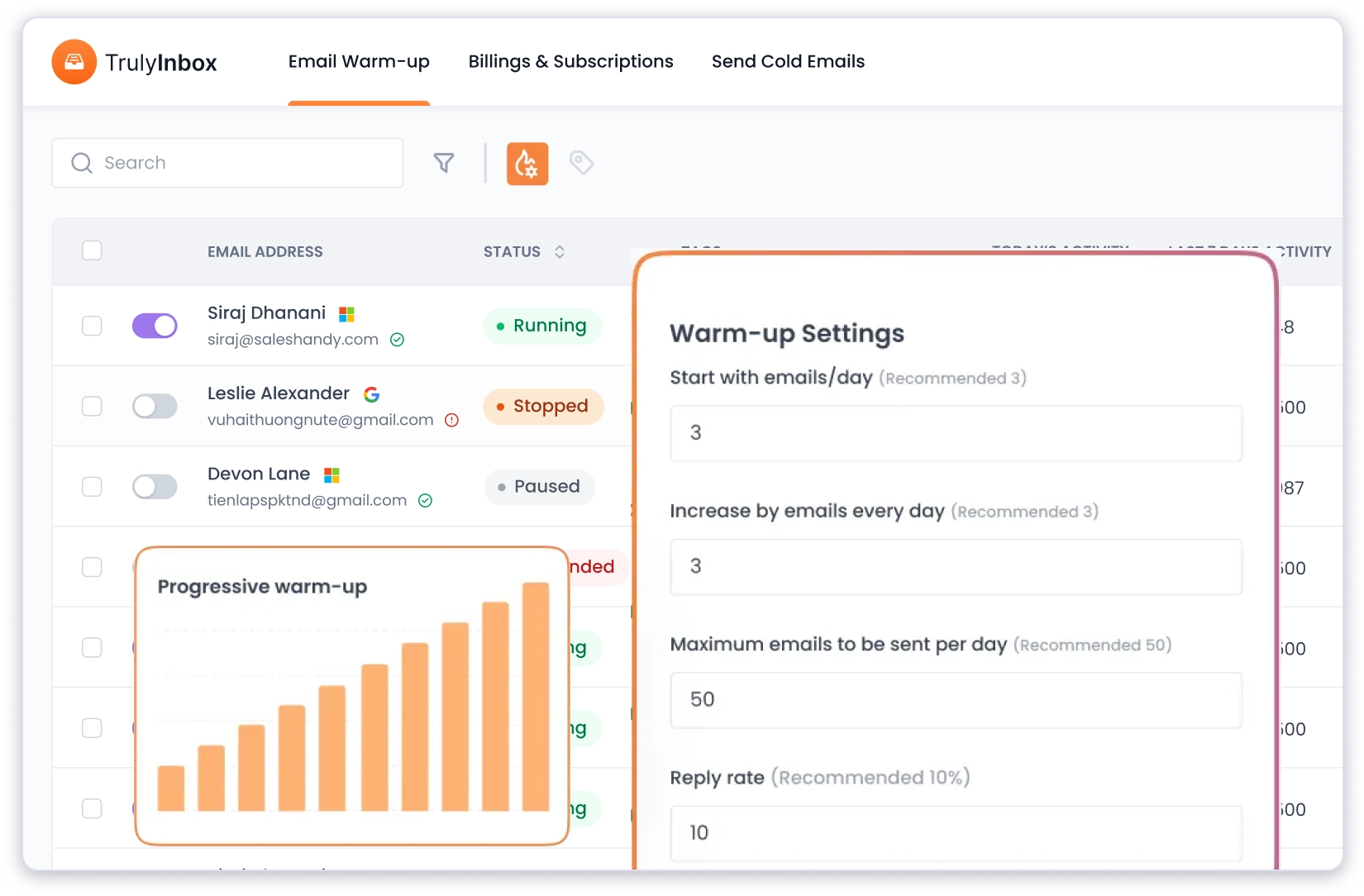
I picked progressive ramp-up for the new accounts and randomized for the older ones.
This made a noticeable difference compared to email warm-up service providers, where you just toggle warm-up on, and there’s one generic approach for every account.
The new accounts hit 95% inbox placement by week 3 and climbed to 98% by week 4. The older accounts with reputation damage recovered to about 96% in just over 2 weeks.
The warm-up content is AI-generated across 50+ industries and 12 languages, which means the emails exchanged during warm-up actually read like real business conversations.
You can select your industry, choose the language, and the warm-up content adapts to match.
Combined with the human-like sending behavior (varied send times, staggered replies, marking emails as important), the whole warm-up felt genuinely organic.
The network consists of 10,000+ real email inboxes, and TrulyInbox auto-pauses warm-up if your SPF, DKIM, or DMARC isn’t configured correctly.
That safety net caught a misconfiguration on one of my test domains before any damage was done.
Pros
- AI warm-up content across 50+ industries and 12 languages
- Choose your warm-up language and industry
- 10,000+ real email inbox network
- Unlimited accounts on every paid plan
- Auto-pause if SPF, DKIM, or DMARC is misconfigured
- Graphical reporting dashboard with inbox vs. spam tracking
- Forever-free plan available
Cons
- Free plan capped at 10 warm-up emails/day
- No advanced warm-up network filtering
Pricing (Billed Annually):
- Free Forever: $0/1 email account
- Starter: $22/mo/unlimited email accounts
- Growth: $59/mo/unlimited email accounts
- Scale: $142/mo/unlimited email accounts
- Business: 217/mo/unlimited email accounts
What do users have to say?
“TrulyInbox really helps when it helps with email management. I love its simple and user-friendly design, it helps me to focus on what matters. Replies are humane, it makes the communication and connection much much better and efficient.” Read the full review on G2
PS: You can read my detailed TrulyInbox review to see how it performed over 2 months of testing
2. Lemwarm
Best for ⭐
Teams already using Lemlist for cold outreach
Lemwarm is the warm-up tool that comes bundled with Lemlist, and that context matters for how you evaluate it.
If you’re already running cold email campaigns in Lemlist, Lemwarm is included free on all paid plans (Essential tier).
That alone makes it worth using. Paying for a separate warm-up tool when one is already bundled into your outreach platform doesn’t make financial sense.
I tested Lemwarm on 5 email accounts over the same 4-week period.
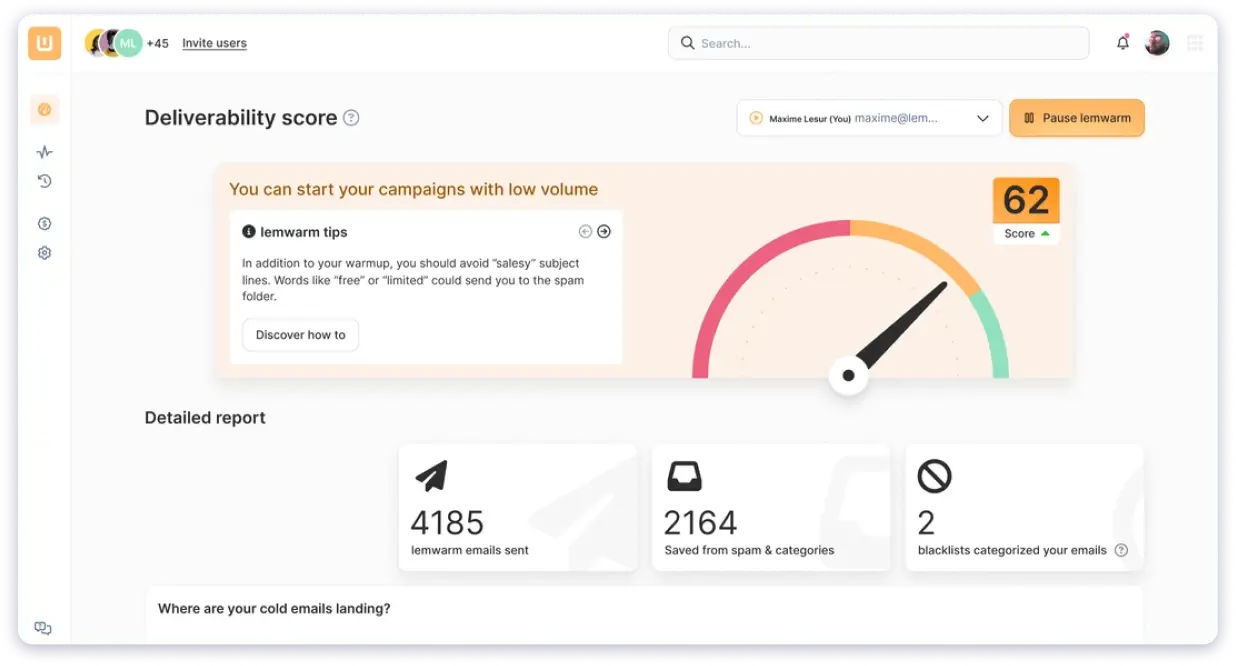
The warm-up emails are exchanged with a network of 20,000+ domains across 150+ countries, which is one of the more diverse networks I have come across.
During setup, Lemwarm asks a few targeting questions about your industry, ICP, and whether you’re B2B or B2C. It then groups you into a “cluster” of similar senders so the warm-up interactions look natural.
The feature I found most useful was the deliverability test. Before launching a campaign, I could send a test email to Lemwarm’s inboxes and see exactly where it landed, broken down by ESP.
It flagged a Gmail-specific issue on one of my accounts that I would have completely missed otherwise. That kind of pre-launch validation goes beyond standard warm-up.
Pros
- Included free with all paid Lemlist plans
- 20,000+ domain warm-up network across 150+ countries
- Deliverability test shows inbox vs. spam placement per ESP
- DNS check for SPF, DKIM, DMARC, plus SpamAssassin score
- Industry-specific warm-up clustering
- Simple 4-step setup process
Cons
- Expensive as a standalone tool
- Smart plan features did not produce noticeably better results than Essential in my testing
- Daily warm-up capacity capped at 40 emails
- No unlimited inbox option
Pricing (billed annually):
- Essential: $24/mo/email
- Smart: $40/mo/email
- Custom: Contact sales for 10+ users
What do users have to say?
“The best thing is their Lemwarm feature for warm-up activity.” Read the full review on G2
Already used this platform? You can check out Lemwarm alternatives to choose the right platform for your requirements.
3. Warmy.io
Best for ⭐
AI-driven warm-up with deep customization for agencies
Warmy.io is one of the more feature-rich email warmup tools I tested.
The platform is powered by an AI engine called “Adeline” that handles your warm-up strategy, deciding volume, timing, and engagement patterns based on your account’s reputation.
What stood out immediately was the customization depth.
You can choose the warm-up topic, language, and even feed it your actual email templates so the warm-up content matches what you’ll eventually send in real campaigns.
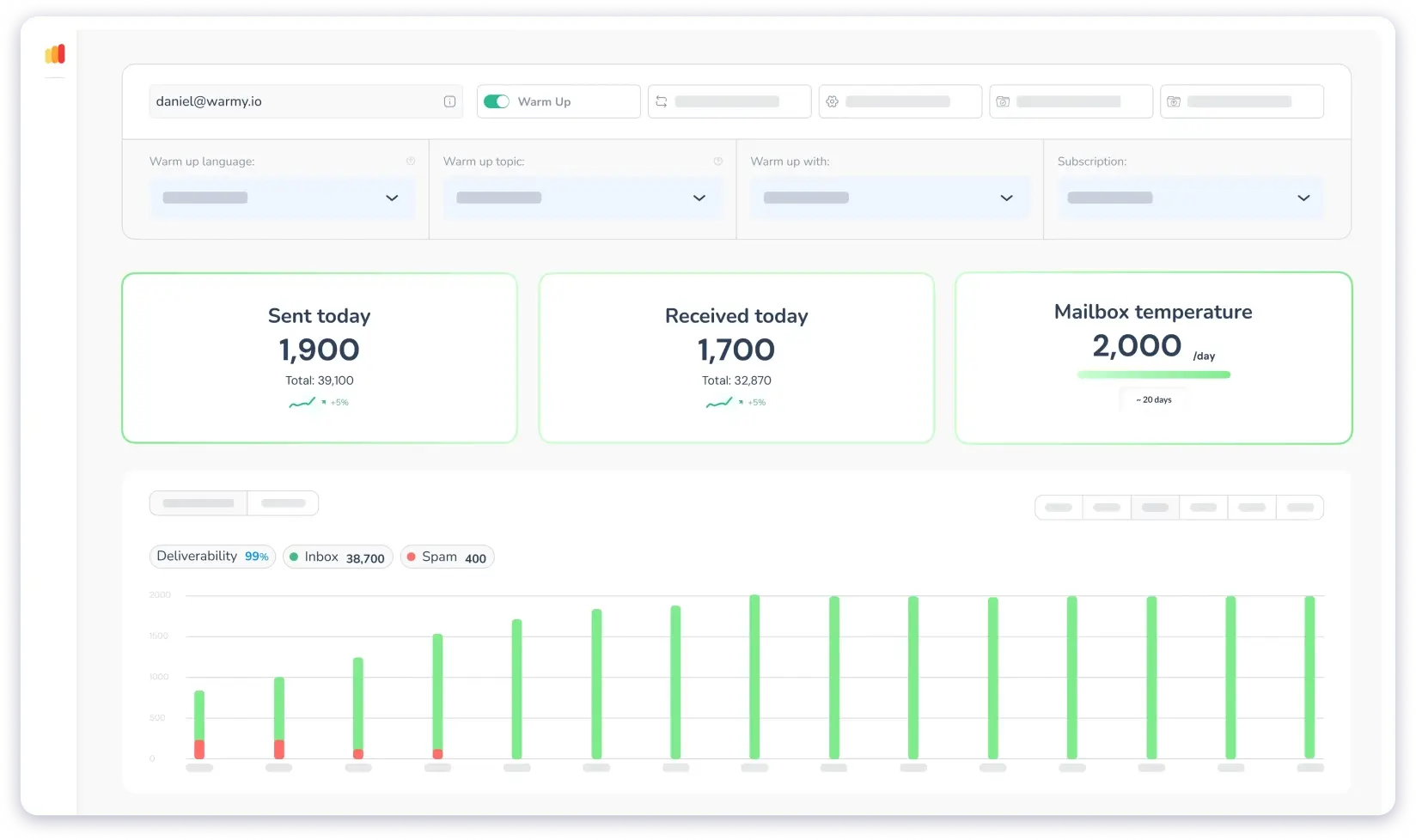
Most tools use generic warm-up content that looks nothing like real outreach. Warmy takes a different approach, and the intent behind it makes sense.
I tested Warmy on 3 accounts. Inbox placement reached about 95% after 4 weeks. The deliverability insights dashboard gave me a clear view of what was working and where gaps remained.
Warmy also offers white-labelling for agencies, which is a useful addition if you’re managing outreach for multiple clients under your own brand.
The trade-off is cost. Warmy uses custom pricing, and based on my experience and conversations with other cold emailers, warming up 10 accounts can easily run $900+ per month.
For teams with budget flexibility, the customization might justify the premium. For most teams, it’s hard to justify using tools that deliver comparable results at a fraction of the price.
Pros
- AI engine customizes warm-up based on your account data and reputation
- Template warm-up lets you use your actual email content during warm-up
- Choose a warm-up topic and language
- White-labelling available for agencies
- Integrations with multiple sales and productivity platforms
- Detailed deliverability insights dashboard
Cons
- Custom pricing makes it difficult to compare upfront
- Gets expensive at scale
- Customer support response times were slow in my experience
- Per-inbox pricing model
Pricing (billed annually)
- Custom pricing — contact Warmy.io for a quote
- Free trial available
What do users have to say?
“Warmy is a reliable tool that delivers on its promises. It helps improve your email deliverability, which is crucial for successful email marketing. I send emails every day with it, and I’m getting good results. They have a free trial, too, which is how I got started.” Read the full G2 review
Already used this platform? You can check out Warmy.io alternatives to choose the right platform for your requirements.
4. MailReach
Best for ⭐
Figuring out why your emails hit spam, not just warming them up
MailReach approaches email warm-up differently than most tools. It’s not just about sending and receiving messages. It’s about diagnosing deliverability problems and helping you fix them.
I connected 4 accounts and ran the warm-up for 4 weeks. Inbox placement settled at around 92%, which is lower than some tools on this list.
‘But MailReach earned its spot through the AI Deliverability Assistant.
The assistant checks your SPF, DKIM, and DMARC configuration, analyzes inbox placement patterns, and flags reputation issues before they spiral.
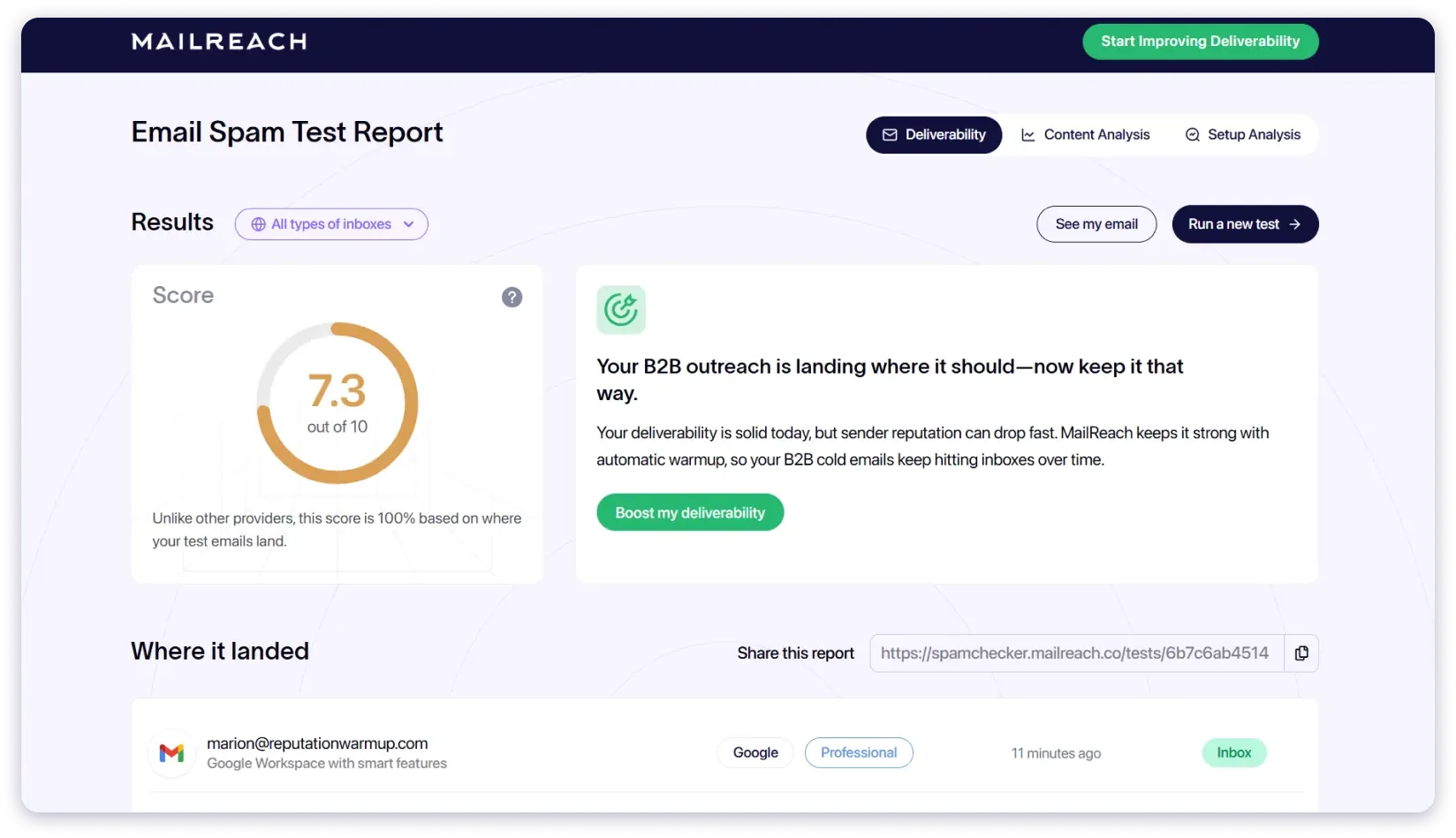
It then gives specific, actionable recommendations: adjust sending volume, warm up longer, tweak email content.
I found this genuinely valuable when one of my accounts was stuck at 80% placement and I couldn’t pinpoint the cause. MailReach identified a DKIM alignment issue that every other tool in this test missed.
The warm-up network consists of 30,000+ real inboxes. The algorithm ramps volume gradually and uses a mix of opens, replies, and spam-folder rescues to build reputation.
PS: I wrote a full MailReach review covering everything from warm-up performance to spam testing accuracy checkout it out for knowing things in detail!
Pros
- AI assistant identifies SPF, DKIM, DMARC, and reputation issues
- Spam testing with real inbox placement data
- 30,000+ real inbox warm-up network
- Blacklist monitoring
- Specific, actionable fix recommendations
- Instant alerts via Slack or webhook when reputation drops
Cons
- Per-inbox pricing adds up at scale
- Inbox placement rate was lower than some competitors in my testing
- Limited ability to customize warm-up email templates
- Support can be slow during peak periods
Pricing (billed annually)
- Email Warmer: $20/mo/mailbox
- Spam Tester: $43.20/mo
- Custom/Agency pricing available
What do users have to say?
“MailReach automates the process of sending emails to your receiver, and the learning curve is minimal. You just need to sign up, choose a plan, connect your email address, and start with warm-up emails to test the best strategy to reach your targets.”- Read the full review on G2
5. Warmup Inbox
Best for ⭐
ESP-specific warming, especially for Gmail accounts
Warmup Inbox uses a network of over 30,000 real inboxes, which is one of the larger networks I came across during testing.
I connected 3 Gmail accounts and ran warm-up for 4 weeks. Inbox placement reached about 93%. The feature that made the biggest difference was ESP-specific warm-up targeting.
Instead of warming up generically across all providers, you can tell Warmup Inbox to focus engagement specifically on Gmail, Outlook, or whichever ESP is giving you trouble.

I used this on my Gmail accounts, and the improvement was noticeable. Emails that were consistently landing in promotions or spam started reaching primary within 2 weeks.
The platform also includes a few free tools built into the dashboard: a DMARC record generator, SPF generator, and email spam checker. Having these in the same interface saves time when you’re setting up new domains from scratch.
Pricing transparency is where Warmup Inbox falls short. The plans aren’t easy to compare upfront, and most of the advanced features sit behind higher-tier subscriptions. I had to spend time digging around to figure out what was actually included at each level.
Pros
- 30,000+ real inbox warm-up network
- ESP-specific warm-up targeting
- Built-in free tools including DMARC generator, SPF generator, and spam checker
- Language selection for warm-up emails
- Cold email sequence builder included in the platform
Cons
- Pricing structure is not transparent
- Advanced features are locked behind higher-tier plans
- Per-inbox pricing model
Pricing (billed annually)
- Basic: $15/mo/inbox
- Pro: $49/mo/inbox
- Max: $79/mo/inbox
- Pro Bundle: $37/mo/inbox
PS: I’ve compared 8 Warmup Inbox alternatives that offer similar features at more scalable pricing
What do users have to say?
“Cleared up all deliverability mysteries. I finally get it! Plus, it made the technical aspect of doing it all so easy to implement. Makes a big difference.” Read the full review on G2
6. Folderly
Best for ⭐
Deep spam analysis when you need to know exactly what’s triggering filters
Folderly is more of a deliverability diagnostics suite than a pure warm-up tool. And that’s where it delivers the most value.
I tested Folderly on 2 accounts.
The monitoring feature stood out. It identifies specific reasons your emails land in spam (content triggers, reputation issues, authentication gaps) and gives you actionable recommendations to fix each one.

It can also detect whether your emails are being filtered to promotions vs. spam, a distinction most tools don’t make.
Inbox placement reached about 96% after 4 weeks, which is strong.
The catch is pricing. Folderly starts at $39/month per inbox on the Starter plan. The plans with full diagnostic capabilities run $159 to $399 per month.
For a tool that mainly handles warm-up and spam analysis, that’s a significant investment. Especially when tools offering comparable warm-up results charge a fraction of this amount.
I’d suggest Folderly if you have a specific, persistent deliverability problem that you haven’t been able to solve with standard warm-up. For ongoing, day-to-day warm-up needs, there are better value options.
You can read my complete Folderly review for a deeper look at its diagnostics capabilities
Pros
- Detects specific Gmail and Outlook spam reasons
- Content analysis with fix recommendations
- DNS records check and setup support
- Separate spam vs. promotions detection
- Removes emails from promotions folder
Cons
- Pricing plans are expensive for startups and small teams
- Overkill for teams that just need a basic warm-up
- It does not offer a free trial
Pricing (billed annually)
- Starter: $39/month
- Growth: $159/month
- Pro: $399/month
- Agency: $1,199/month
What do users have to say?
“I like how Folderly makes email deliverability easy to manage. The tool gives clear insights and actionable tips, helping to keep emails out of spam folders. The interface is intuitive, so setting up and monitoring campaigns is quick and straightforward.” Read the full review on G2
7. Warmbox
Best for ⭐
Budget-friendly warm-up with decent customization
Warmbox is one of the more affordable email warm-up tools on this list, starting at $15/month.
I tested Warmbox on 3 accounts. It uses a network of 35,000 inboxes across 100+ countries, and the warm-up emails are generated using GPT-4.
You can customize the email volume, reply rate, sender reputation targets, and audience. One feature I appreciated was the plug-and-play warm-up strategies.
You can pick a preset strategy with one click instead of configuring every setting manually.
Inbox placement reached about 90% after 4 weeks, the lowest among the top tools in my test, though still a meaningful improvement from where the accounts started (around 72 to 76%).

The customization is solid for the price. You can set warm-up schedules, enable auto-remove from spam, and monitor deliverability with a live DNS and blacklist checker.
The plan structure gets confusing at higher tiers, and the 90% placement rate suggests the network quality may not be as strong as tools using Google Workspace and Microsoft 365 accounts.
Pros
- Starts at $15 per month
- 35,000 inbox warm-up network across 100+ countries
- GPT-4 generated warm-up content
- Customizable volume, reply rate, and warm-up schedule
- Plug-and-play warm-up strategies with one-click setup
- Auto-remove from spam
- Live DNS and blacklist checker
Cons
- Lowest inbox placement rate in my test
- Plan structure gets confusing at higher tiers
- Per-inbox pricing still applies to premium plans
- No G2 reviews available
Pricing (billed annually)
- Solo: $15/month
- Starter: $69/month
- Growth: $139/month
- Team: Custom pricing
What do users have to say?
No reviews on G2
8. Mailwarm
Best for ⭐
Simple, set-and-forget warm-up
Mailwarm is as straightforward as email warmup tools get. Connect your accounts, set the warm-up volume, and let it run in the background.
I tested it on 2 accounts. The warm-up network includes 1,000+ real inboxes that interact with your emails through opens, replies, spam-folder rescues, and marking as important. Inbox placement reached 93% after 4 weeks.
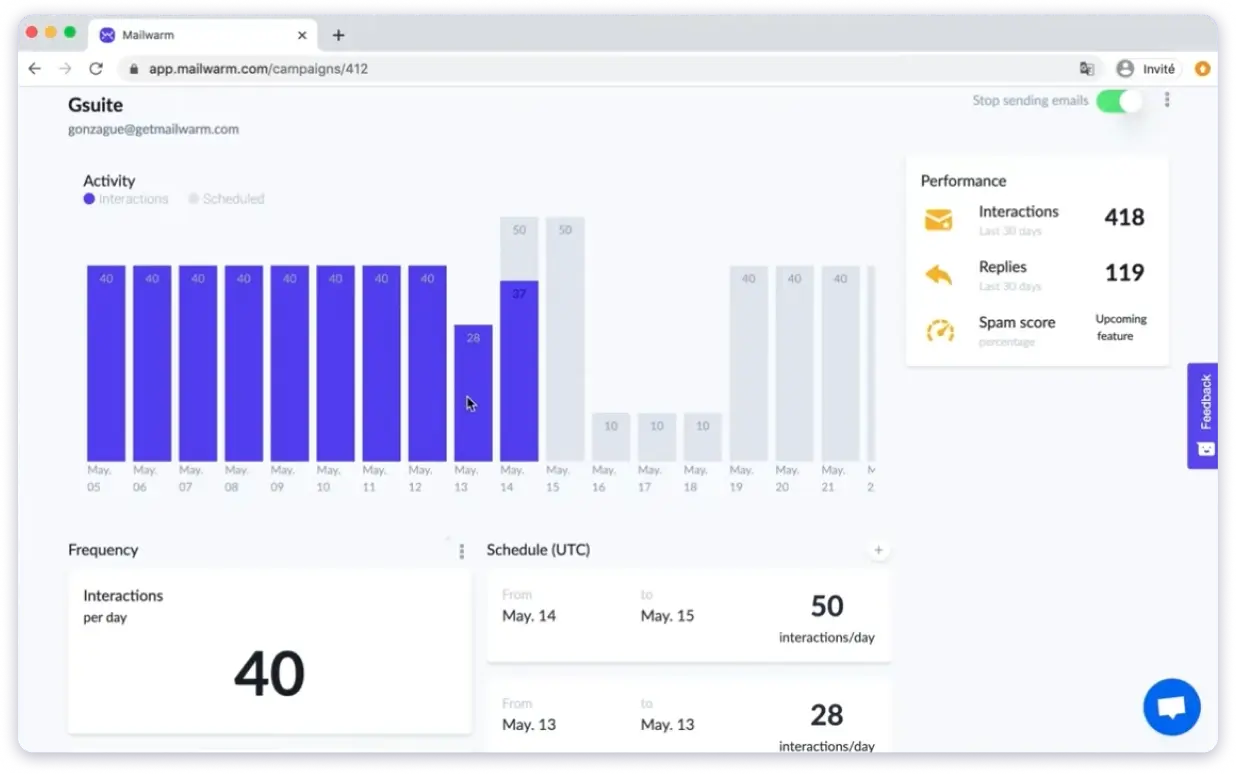
The dashboard is clean and minimal. You see daily warm-up activity at a glance and can scale volume up or down with one click. There’s nothing complicated about it.
The issue is what you’re paying for that simplicity. At $69/month per inbox, Mailwarm is one of the more expensive options on this list relative to what it offers.
The warm-up network is significantly smaller than competitors (1,000+ vs. 20,000 to 35,000), and the warm-up content felt templated and generic compared to tools that use AI-generated conversations.
Pros
- Quick, no-fuss setup
- Clean dashboard for monitoring
- Custom SMTP support
- Blacklist monitoring
- Easy to pause and resume
Cons
- Expensive for what it offers
- Smaller warm-up network compared to competitors
- Warm-up content feels templated and repetitive
- Limited features at this price point
Pricing (billed annually)
- Starter: $69/month
- Growth: $159/month
- Scale: $479/month
What do users have to say?
No Reviews on G2
9. InboxAlly
Best for ⭐
Advanced engagement signals beyond basic opens and replies
InboxAlly takes a different approach to warm-up. While most tools focus on opens, replies, and spam rescues, InboxAlly adds engagement behaviors that go deeper.
The “Click Link” feature automatically opens links inside your warm-up emails, signaling to ESPs that recipients are engaging with the content, not just opening it.
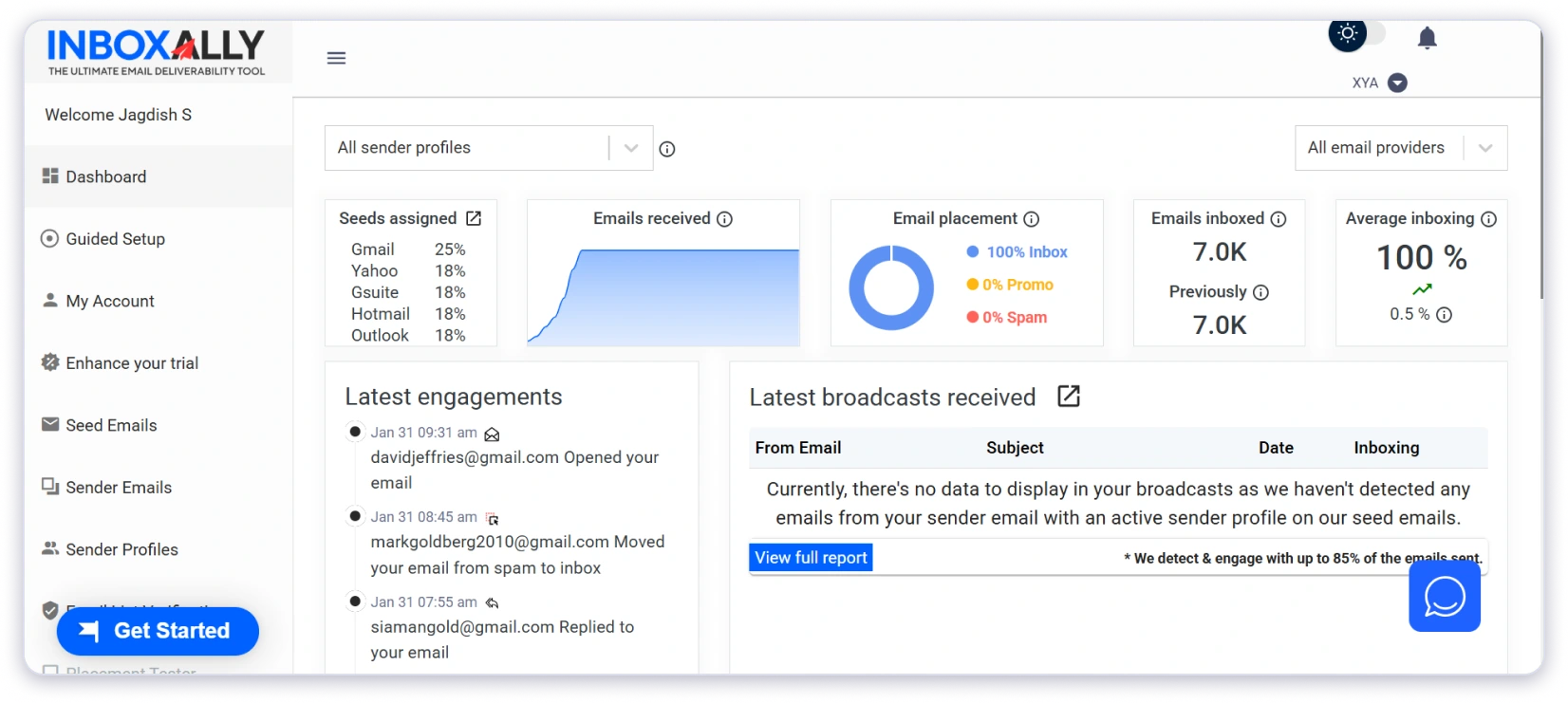
The “Auto-Scrolling” feature scrolls down longer warm-up emails, mimicking real reading behavior and sending high-value engagement signals.
I tested InboxAlly on 2 accounts. Inbox placement reached 91% after 4 weeks. The engagement depth is unique, but the results didn’t match the premium price tag in my testing.
At $149/month per inbox on the Starter plan, InboxAlly is the most expensive tool on this list by a wide margin. The Plus plan jumps to $645/month.
For most cold email teams, that cost is impossible to justify when tools like TrulyInbox deliver higher inbox placement at roughly a tenth of the price.
Pros
- Link clicking within warm-up emails
- Auto-scrolling for long emails
- Compatible with all email providers
- Multiple sender profiles
- Detailed reporting
Cons
- Extremely expensive at the starter level
- Inbox placement did not justify the premium in my test
- Overkill for standard warm-up needs
Pricing (billed annually)
- Starter: $149/mo/inbox
- Plus: $645/mo/inbox
- Premium: $1,190/mo/inbox
- Enterprise: Custom pricing
What do users have to say?
“With the help of this tool, I have been able to increase the deliverability of emails on any IP or domain on any platform with huge success.” Read the full review on G2
10. Snov.io Email Warm-Up
Best for ⭐
Teams that want a warm-up bundled with lead finding and outreach in one platform
Snov.io is not a dedicated warm-up tool. It’s an all-in-one outreach platform that includes warm-up as part of the package.
If you’re already using Snov.io for lead finding, email verification, and campaigns, the built-in warm-up saves you from adding another tool to your stack.
The free tier gives you 1 warm-up slot with 450 warm-up emails (one-time, non-renewable). On the Starter plan, you get 3 warm-up slots. Unlimited warm-up is only available on Pro plans.

I tested the warm-up on 2 accounts. Setup was simple: connect your inbox, pick a warm-up strategy, set the reply rate to the recommended 30%, and let it run. Inbox placement reached about 93% after 4 weeks.
One feature worth noting is the Premium Warm-up Pool.
You can choose to warm up exclusively with corporate and business domains, which gives your account a faster credibility boost compared to a mixed network of personal and professional inboxes.
ESPs weigh engagement with professional accounts more heavily.The limitation is that warm-up is just one piece of Snov.io’s platform.
If all you need is a warm-up, paying $39+ per month for a full outreach suite doesn’t make sense when dedicated tools cost less and do warm-up better.
Pros
- Warm-up is included with all paid plans
- Premium warm-up pool with business domains only
- Part of an all-in-one platform with lead finder, campaigns, and CRM
- Deliverability test with DNS checks
- Free tier available for testing
Cons
- Only 3 warm-up slots on the Starter plan
- Unlimited warm-up requires a higher plan
- Free tier warm-up emails are one-time only
- You may end up paying for a full outreach platform when you only need warm-up
Pricing (billed annually)
- Trial: Free/1 warm-up slot
- Starter: $30/mo/3 warm-up slots
- Pro S: $75/mo/unlimited warm-up
- Pro M: $142/mo/unlimited warm-up
- Pro L: $277/mo/unlimited warm-up
Want to understand exactly what you’re paying for?
Here’s my breakdown of Snov.io pricing plans and limits.
What do users have to say?
“I mostly use Snov.io for cold email campaigns and it’s been super helpful. The warm-up feature kept my emails out of spam, and the verification tool saved me from a lot of bounces.”- Read the full review on G2
11. Warmforge
Best for ⭐
Inbox placement testing and ongoing deliverability monitoring alongside warm-up
Warmforge is the newest tool on this list, and it brings something most warm-up tools don’t offer: real visibility into where your emails land before you start outreach.
The warm-up works like most tools.
AI-generated emails that mimic real conversations, gradual volume increase, and spam folder rescue.
But Warmforge’s differentiator is the deliverability dashboard. It tracks a “heat score” (out of 100) for each mailbox, runs monthly inbox placement tests across Gmail and Outlook, and monitors DNS/MX records and blacklist status in real time.

I tested Warmforge on 2 accounts. Inbox placement reached about 91% after 4 weeks. The placement test feature gave me confidence that the accounts were ready before I started sending real campaigns.
The warm-up network uses exclusively aged Google Workspace and Microsoft 365 accounts.
No synthetic inboxes, no recycled accounts. That’s a deliberate quality play that shows in the engagement signals.
Pros
- Inbox placement testing with 1 free test per month
- Heat score monitoring per mailbox
- DNS, MX, and blacklist health checks
- Exclusively aged Google Workspace and Microsoft 365 accounts in the warm-up network
- Clean, modern interface
- Bulk pricing discounts available
Cons
- No free trial
- Newer tool with limited public reviews
- Per-inbox pricing still adds up at scale
- Only supports Gmail and Outlook
Pricing (billed annually)
- $12/month per inbox
- Bulk discounts (as low as $3/inbox)
What do users have to say?
“Warmforge makes warming domains and inboxes simple and reliable. The setup is straightforward, and the automation runs quietly in the background without needing constant adjustments.” Read the full review on G2
Start Your Email Warm-Up Today
Well, it’s just email warm-ups.
It should run on AUTOPILOT!
If you are still reading this and are not sure which email warm-up tool to opt for, I suggest you go for TrulyInbox.
Why?
Because it is good at its job (i.e., warming up emails) and is natively integrated with Saleshandy.
All you have to do is connect your email account with Trulyinbox in Saleshandy and forget about it.
If you’re still deciding, here’s the simplest path to get started:
Step 1: Sign up for Saleshandy. 7-day free trial, no credit card required.
Step 2: Saleshandy connects natively with TrulyInbox. Your warm-up kicks in automatically when you connect your email accounts.
Step 3: After 2 to 4 weeks of warm-up, use inbox placement testing to check where your emails land across Gmail, Outlook, and Yahoo.
Step 4: Start sending. Your inboxes are ready. Once your accounts are warmed up, use Saleshandy’s inbox placement test to check where your emails land before you start real campaigns.
FAQs on Email Warm-Up Tools
1. What is the best email warmup tool in 2026?
TrulyInbox. It delivered 98% inbox placement in my test, lets you connect unlimited inboxes on every plan, and costs less than most tools charge for a single account. It also has a forever-free plan.
2. What are email warm-up services and do I need one?
Email warm-up services build your sender reputation by automatically sending and receiving emails on your behalf. If you’re sending cold emails from a new or inactive account, you need one. Without warm-up, your emails will almost certainly land in spam.
3. How long does email warm-up take?
2 to 4 weeks for most accounts. New domains take closer to 4 weeks. Older accounts with mild reputation damage can recover in 2 to 3 weeks. Keep warm-up running even after you start real campaigns.
4. Can I warm up my email for free?
Yes, with limits. TrulyInbox has a forever-free plan (10 warm-up emails/day). Snov.io gives you 1 free warm-up slot with 450 one-time emails. Good enough for testing, not enough for serious outreach.
5. Is email warmup legal?
Yes. These tools operate within a network of verified users who consent to receive warm-up emails. The process is compliant with GDPR and CAN-SPAM.
6. Which email warm-up tool is best for B2B cold outreach?
TrulyInbox. It integrates with Saleshandy (800M+ B2B lead database), supports unlimited accounts, and generates warm-up content across 50+ industries. If you use Lemlist, Lemwarm comes free with your plan.
7. How do I choose an email warm-up service for my team?
Check three things: how many inboxes you need, your budget, and whether you need diagnostics. For 5+ inboxes, pick flat-rate pricing (TrulyInbox). For spam troubleshooting, try MailReach or Folderly.
8. What’s the difference between email warm-up and email ramp-up?
Warm-up builds sender reputation before you send real campaigns. Ramp-up gradually increases your sending volume during campaigns. Different stages, different purposes, both important.
9. Do email warm-up tools actually work in 2026?
Yes. Every tool on this list improved inbox placement in my testing. The best ones pushed it above 95%. But warm-up won’t fix broken SPF/DKIM/DMARC, spammy copy, or bad lead lists. It’s the foundation, not the whole building.